
While the number of people needing music is steadily increasing, not everyone needs to become a composer. Current digital work—such as short videos, product introductions, personal branding, educational content, and hobby projects—demands music more frequently than one might expect. The problem is that even with an idea, the process of translating it into an actual song feels more distant than anticipated. One may have a mood in their head but struggle to organize it into a melody; even after writing lyrics, it is difficult to bring the arrangement and vocal texture to life exactly as envisioned. In this context, tools like AI Music Generators are less like machines that completely replace music production and more like work interfaces that connect a creator's thoughts to the final product over a shorter distance.
My impression based on the flow of the official page was clear. This platform is not merely a toy-like service that generates songs with a single command; rather, it is designed to allow users to control the direction of the results through input methods, model selection, the presence of vocals, and length and style settings. Therefore, it lowers the barrier to entry for newcomers while leaving room for detailed control for those who already have a clear vision of what they want to achieve. This balance is quite important, as overly automated tools are difficult to understand, while overly professional tools make even getting started feel overwhelming.
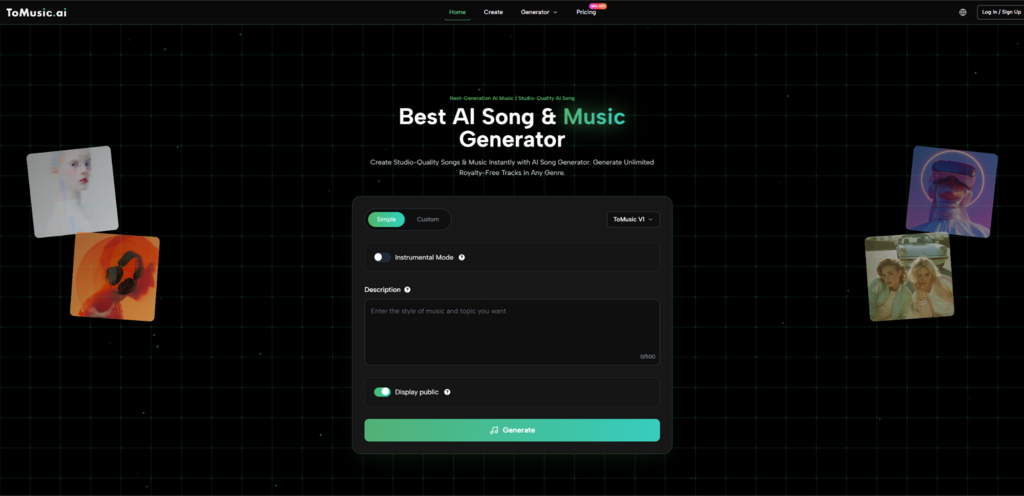
Another interesting point is that as users go through this process, they gradually organize their musical intentions into more precise language. A person who vaguely thought they wanted an “emotional song” begins to consider tempo, instruments, vocal tone, and even the structure of the composition during the actual input stage. As a result, this tool functions not only as a music generator but also as an organizing tool that concretizes the creator’s judgment.
A way to reduce the music production process more realistically
Based on ToMusic's official workflow, the overall structure may appear complex, but it is not difficult to understand. First, the user decides how to create the song. If you want a quick draft, enter Simple Mode; if you want to directly control the lyrics and style, select Custom Mode. Next, select a model and determine whether vocals or just instrumental are needed. The process then involves adding a title, style, lyrics, or a descriptive sentence to create the track.
This structure is meaningful because it allows users to avoid making too many decisions at once from the start. Those with little experience in music creation can begin by defining the desired mood, while those with a clearer purpose can proceed to lyrics and composition. In other words, the starting point varies depending on the user's proficiency. This design is particularly useful in practical work. For professionals like video editors or marketers who need music but haven't used professional composition tools for a long time, the ability to get started quickly is a significant advantage.
The comfort of first entry provided by Simple Mode
Simple Mode is, quite literally, a description-based input method. Users write information such as genre, mood, tempo, instrument feel, and vocal impression in natural language to generate results. The strength of this structure is that even those without knowledge of music theory can access it immediately. This is because one can express the desired impression verbally even without writing sheet music. You can start with just intuitive descriptions, such as “bright synth-pop,” “gentle piano ballad,” or “dreamy, night-atmosphere electronic music.”
In my opinion, this method seemed to work particularly well during the idea sketching stage. While it can be used to obtain a finished song immediately, I felt its advantages outweighed those of quickly testing various directions. This is because the flow of adjusting the direction while listening to the results, rather than fixing details too strictly from the start, feels natural.
The sharper results created by custom mode
On the other hand, Custom Mode is better suited for purposeful tasks than simple mood generation. By inputting a title, style, and lyrics, users can more directly design the meaning and structure of a song. Even for songs with the same atmosphere, the intended use of the result varies significantly depending on the lyrics used. Custom Mode is much more advantageous when content needs to be conveyed, such as with short songs containing brand messages, theme songs for personal projects, or descriptive lyrics tailored to specific scenes.
This difference is difficult to explain simply by the number of options. Custom mode allows users to shift their desired outcome from a level of a "good feel" to that of a "song with this kind of progression and message." Therefore, it is closer to the sensation of guiding the direction and organizing together, rather than the feeling of outsourcing the music production.
Why inputting lyrics structure enhances the sense of control
A notable aspect of the official flow is the ability to handle lyrical structure in part units rather than as simple text. The ability to divide the song's progression through notations such as [Verse], [Chorus], [Bridge], [Intro], and [Outro] is on a completely different level from simply inserting sentences. Users are compelled to consider which part marks the introduction of the story, which section captures the core of the emotion, and where the song expands.
This method does not magically guarantee a high level of quality. However, the clearer the structure the user presents, the higher the likelihood that the result will be closer to the intended goal. In my experience, while it cannot be definitively said that AI-based generation tools are always better with more detailed input, input that is at least mindful of the song's progression makes it easier to interpret and modify the results.
Why Model Selection Changes the Nature of Outcomes
One of the key factors that makes this platform more than just a simple generator is the availability of multiple models. According to the official page, V1, V2, V3, and V4 are available, with each model highlighting different characteristics. It is more natural to understand this difference not as a simple numerical upgrade, but rather as meaning that the selection criteria change depending on the task the user performs.
Based on the official descriptions, the V4 appears to emphasize more natural vocal expression and creative control. The V3 boasts rich harmonies, complex rhythms, and more refined audio textures. The V2 is closer to an impression of long progression and deep tone, while the V1 seems to be a model that is easy to try without feeling overwhelmed in terms of balance and speed. This distinction ultimately leads users to consider "what purpose a song needs right now" rather than "which song is better."
Why Choosing a Purpose-Specific Choice Is More Important Than Just One Best Model
In reality, what matters in music generation is suitability rather than absolute superiority. The standards differ for songs where the vocal presence is crucial and for background music that plays stably behind the video. For the former, expressiveness and communicative power are important, whereas for the latter, flow and stability may be more critical. A structure that provides multiple models can be seen as reflecting these differences to some extent.
Therefore, in my judgment, it is more realistic to approach the process according to the stages of work rather than insisting on the most luxurious models from the start. Speed of iteration is important during the early draft verification stage, while detail and expressiveness become more critical as you get closer to final use. Understanding the nature of models in this way makes the criteria much clearer when comparing generated results.
The relationship between song length and working rhythm
Based on the official page, V2, V3, and V4 support longer song structures, while V1 gives the impression of being shorter and closer to a balanced flow. This difference signifies more than just the numerical limit of minutes. This is because as a song gets longer, the ability to maintain the mood, the power to drive the progression, and the shifting of emotional stages become more critical.
Conversely, for short ad clips or music for social content, conveying a key impression quickly may be more important than an overly long composition. Therefore, the song length option appears to be not merely a convenience feature, but a factor that changes one's mindset depending on the purpose of the work.
Actual Usage Steps Understood Through the Official Flow
The flow of this platform is clearer than it appears. If you organize it based solely on the elements found on the official page, the entire usage process can be understood within four steps. Since it is not structured to involve directly manipulating numerous tracks like complex arrangement tools, but rather guides results through input and selection, it is relatively easy to get started with.
The first step is to select the generation method.
First, choose either Simple or Custom. Simple is more natural if you want to quickly check your ideas, while Custom is a better fit if you want to reflect your own lyrics and a more specific direction. Rather than trying to use all the features from the start, it is important to determine what you need right now.
The second step is determining the model and vocal direction.
Next, select a model from V1 to V4 and decide whether to create vocal tracks or instrumental tracks. The Instrumental setting is particularly important at this point. Instrumental mode may be more practical if vocals are not needed, such as for content background music, while a vocal-centric selection is more suitable if you want a song with a message or a complete song form result.
The third step is entering the description or lyrics.
Now, the core information of the song is entered. Users can add the title, style, descriptive sentence, and lyrics. In this process, the Text to Music feature feels like more than just converting text into audio. In reality, it is closer to the process of transforming vague planning notes into a listenable audio draft. While you can start with a short one-line description, the more you gradually specify the genre, mood, tempo, instruments, and vocal feel, the easier it becomes to interpret the result.
Points to consider when refining input sentences
Writing at length isn't necessarily the right answer, but it is better to at least include the core direction of the song. For example, rather than simply writing "an emotional song," describing it as "a slow-tempo, warm, piano-centered track with female vocals that build emotion in the latter half" makes the intention clearer. In my opinion, natural expressions—the kind people actually use to describe music—were easier to handle than overly technical sentences.
The fourth step is saving results and iterative adjustment.
Once generation is complete, listen to the results, compare them, and make adjustments. According to the official description, the generated output is stored in a cloud library, making it easy to retry based on previous results. This is more important than you might think, because AI music generation is less about finding a perfect answer in one go and more about discovering a usable direction and gradually refining it.
A scene where this tool seems particularly useful
It is difficult to say that this platform solves all music production problems. However, it appears very practical in certain situations. Its strengths are particularly evident when music is a component that completes other content, rather than the final product itself.
| Comparison items | Meaning in actual use | Points to help with understanding |
| Input method flexibility | Supports both descriptive and lyric input. | Accessible to both beginners and purpose-driven users |
| Model selection structure | Tendencies are divided from V1 to V4 | The direction of the result can be adjusted according to the purpose of the work. |
| Separation of vocals and accompaniment | It is possible to produce vocal tracks and instrumental tracks separately. | Wide range of applications for video, marketing, and personal creative work |
| Length correspondence range | Some models handle longer developments | You can choose from short drafts to long flows. |
| Storage and iterative generation | You can try again based on the previous results. | Advantageous for improvement-oriented work rather than finishing everything at once |
| Commercial Use Standards | The flow of commercial use is relatively clear. | Realistic advantages for practical content creation |
Why it fits well with the content production team
Teams that frequently create short videos, product introductions, ad tests, and branded content always need to quickly find the right music. However, outsourcing production every time can be burdensome in terms of time and cost. In this situation, speed of creation and repeatability become very realistic advantages. Rather than expecting a perfect song from the start, approaching it as a way to quickly find a direction that fits the current plan appears to be more efficient.
Why it holds a different meaning for individual creators
For individual creators, this tool may not be limited to just producing finished songs. Rather, it is likely to be more useful for intermediate stages such as sketching ideas, experimenting with lyrics, exploring vocal moods, and matching video tones. The Lyrics to Music AI method is particularly appealing to those who already have sentences in their heads. This is because the sensation of the entire process changes significantly the moment the text transitions from a purely written state to a form that can actually be heard.
The reason why the more you understand the possibilities, the more the limitations become visible
When understanding such tools, it is actually more realistic to avoid focusing solely on their advantages. Even if the formula flow is clear and accessible, the quality of the results is still heavily influenced by the input sentences and selection methods. Even with the same description, the outcome may differ slightly from expectations, and you may need to try multiple times to get close to the desired song. Therefore, it is more accurate to view this platform not as a "machine that produces the correct answer on the first try," but as a creative tool for quickly formulating hypotheses and comparing results.
The reason why prompt dependencies remain
Since the structure dictates the direction, if the user explicitly writes down what they want, the result can become vague. In particular, if only the genre and emotion are included without the song's role, it may sound decent to listen to but may deviate slightly from its actual intended use. Therefore, it is important to consider not only the desired feel but also where the music will be used.
The reason why iterative generation is necessary
AI music generation is still a process of selection and comparison. The first result may not be the best, and the same idea may yield a more suitable direction when re-evaluated with different expressions. However, this iterative nature is both a disadvantage and an advantage, as it allows for testing multiple versions in a much shorter timeframe than traditional methods.
The moment judgment becomes more important than tools
Ultimately, what matters is the user's judgment rather than the tool itself. The process of deciding which model to use, whether vocals are needed or if backing tracks are better, and whether to narrow or broaden the input remains the responsibility of the user. In this respect, ToMusic is closer to a system that helps creators compare and make choices faster, rather than one that replaces them.
The Sense After the Threshold of Music Production Has Changed
My impression based on the official page is clear. The core value of this platform lies not in the claim of automatically creating music itself, but in reducing the time and distance required to transform ideas into actual sound. The workflow—simple and custom modes, various models, vocal and backing track selection, structured lyric input, and saving followed by repeat generation—all point in the same direction: to enable more people to work with music themselves.
Of course, this change does not eliminate the value of professional music production. On the contrary, it reveals the fact that people must possess clearer intentions and judgments. This is because as generative tools become easier to use, the ability to articulate what is desired becomes more important. In this sense, it seems more persuasive to understand platforms like ToMusic not merely as automation tools, but as a work environment that transforms the way today's creators think about and experiment with music.



의견을 남겨주세요