변화의 바람 달라지는__기술의 영원함

우리곁에 확 다가온, 나노바나나 2 이야기

멀티 모달 기능을 끌어올려주셨군요.

2025.11.23 | 조회 305 |
0
|
Weekly poetry의 프로필 이미지

Weekly poetry

문밖으로 한 발자국 내딛는 순간. 다양한 스팩트럼의 지식을 나눠요.

빛과 어둠은 그 역할이 있다.
빛과 어둠은 그 역할이 있다.

📎 Reference Section

첨부 이미지

Nano Banana Pro 활용 전략

올해 가장 강력한 이미지 모델을 제대로 쓰는 법

이번 주 기술 뉴스가 “지능 경쟁”과 “생태계 경쟁”을 가르고 있다면, Nano Banana Pro는 창작자·기업 실무자 모두가 당장 체감할 수 있는 실질적 도구 변화라는 점에서 의미가 큽니다.

아래는 Nano Banana Pro(= Gemini 3 Pro Image) 공식 업데이트의 핵심 내용을 기반으로, 정리한 섹션입니다.


🎨 1) 이미지 프롬프트의 기본 구조를 “5요소 체계”로

Nano Banana Pro는 멀티모달 이해력이 크게 강화되었기 때문에,

프롬프트를 다음 5요소로 구조화하면 결과가 일관되고 전문적으로 나옵니다.

  1. Subject — 누구/무엇을 그릴지
  2. Composition — 구도/프레이밍
  3. Action — 이미지 속에서 일어나는 동작
  4. Location — 공간/배경
  5. Style — 미술·사진적 감성

🔍 2) “카메라·라이팅·색감”을 명시하면

 퀄리티가 두 단계 올라간다

Nano Banana Pro는 카메라 세팅 이해력이 강화되어 있습니다.

1) f 값

→ Aperture / F-stop (조리개 값)

  • 예: f/1.4, f/2.8, f/8
  • 역할: 심도(Depth of Field), 노출, 보케 양 조절

2) ISO

→ ISO Sensitivity (감도)

  • 예: ISO 100, ISO 400, ISO 3200
  • 역할: 센서의 빛 민감도, 노이즈 양에 영향

3) 렌즈 종류

→ Lens Type / Focal Length (렌즈 종류 및 초점거리)

대표적 종류

  • Prime Lens (단렌즈): 35mm, 50mm, 85mm
  • Zoom Lens (줌렌즈): 24–70mm, 70–200mm
  • Wide-angle Lens (광각렌즈)
  • Telephoto Lens (망원렌즈)
  • Macro Lens (매크로 렌즈)
  • Anamorphic Lens (아나모픽 렌즈)
  • Vintage Lens (빈티지 렌즈)

4) 색감 톤

→ Color Grading Style / Color Palette

주요 톤 명칭

  • Teal & Orange Grade (틸 오렌지 시네마톤)
  • Film Look / Film Emulation (필름룩)
  • Moody Grade (무디 톤)
  • High-Contrast Grade (하이 콘트라스트)
  • Glossy Tone (글로시 톤)
  • Monochrome / Black-and-White Grade (흑백톤)
  • Warm Tone / Cool Tone (따뜻한 톤 / 차가운 톤)

5) 스튜디오 조명 조건

→ Lighting Setup / Lighting Condition

대표 조명 방식

  • Key Light (키라이트)
  • Fill Light (필라이트)
  • Back Light / Rim Light (백라이트/림라이트)
  • Softbox Lighting (소프트박스 조명)
  • Beauty Dish (뷰티디쉬 조명)
  • Hard Light (하드 라이트)
  • Diffused Lighting (디퓨즈드 라이트)
  • Golden Hour Lighting (골든 아워 조명)
  • Butterfly Lighting (버터플라이 조명)
  • Rembrandt Lighting (렘브란트 조명)
  • Split Lighting (스플릿 조명)

📦 프롬프트 활용안

Camera Settings

  • Aperture (F-stop)
  • ISO Sensitivity
  • Lens Type / Focal Length
  • Color Grading Style (Teal & Orange, Film Look, Glossy, Monochrome…)
  • Lighting Setup (Key Light, Back Light, Softbox, Rim Light…)
1) f 값 → Aperture / F-stop (조리개 값) 예: f/1.4, f/2.8, f/8 역할: 심도(Depth of Field), 노출, 보케 양 조절 2) ISO → ISO Sensitivity (감도) 예: ISO 100, ISO 400, ISO 3200 역할: 센서의 빛 민감도, 노이즈 양에 영향 3) 렌즈 종류 → Lens Type / Focal Length (렌즈 종류 및 초점거리) 대표적 종류 Prime Lens (단렌즈): 35mm, 50mm, 85mm Zoom Lens (줌렌즈): 24–70mm, 70–200mm Wide-angle Lens (광각렌즈) Telephoto Lens (망원렌즈) Macro Lens (매크로 렌즈) Anamorphic Lens (아나모픽 렌즈) Vintage Lens (빈티지 렌즈) 4) 색감 톤 → Color Grading Style / Color Palette 주요 톤 명칭 Teal & Orange Grade (틸 오렌지 시네마톤) Film Look / Film Emulation (필름룩) Moody Grade (무디 톤) High-Contrast Grade (하이 콘트라스트) Glossy Tone (글로시 톤) Monochrome / Black-and-White Grade (흑백톤) Warm Tone / Cool Tone (따뜻한 톤 / 차가운 톤) 5) 스튜디오 조명 조건 → Lighting Setup / Lighting Condition 대표 조명 방식 Key Light (키라이트) Fill Light (필라이트) Back Light / Rim Light (백라이트/림라이트) Softbox Lighting (소프트박스 조명) Beauty Dish (뷰티디쉬 조명) Hard Light (하드 라이트) Diffused Lighting (디퓨즈드 라이트) Golden Hour Lighting (골든 아워 조명) Butterfly Lighting (버터플라이 조명) Rembrandt Lighting (렘브란트 조명) Split Lighting (스플릿 조명)

이런 요소들을 넣는 순간, ‘AI 이미지’ → ‘실제 촬영한 컷’으로 퀄리티가 달라집니다.

당신의 영상 작업(예: 9:16 패션 쇼츠)에서는 아예 다음처럼 촬영감 기반 프롬프트 템플릿을 써도 좋습니다

A 9:16 cinematic portrait, low-angle shot, shallow depth (f/1.8), diffused backlight, glossy highlights on glass surfaces, monochrome palette with one accent color in electric blue.

 3) 고급 번역·로컬라이징 이미지 제작에 강력

Nano Banana Pro는 텍스트 렌더링 능력과 다국어 지원이 대폭 강화됨.

→ 인포그래픽 번역, 포스터의 다국어 현지화, 글로벌 패션 캠페인 시안 제작에 매우 강력함.

당신의 콘텐츠 전략(브랜딩+AI 교육+국제 시장) 기준

  • 한국어→영어→일본어 버전 콘텐츠를 한 번에 프리뷰
  • 패키지/라벨/포스터의 실제 폰트 느낌 그대로 유지한 채 텍스트만 교체

까지 가능.


4) 14장의 이미지까지 입력하여 “브랜드 룩 일관성 유지”

플랫폼에 따라 최대 6~14장의 이미지를 동시에 입력 가능.

👉 이 기능은 사실상 스튜디오급 레퍼런스 매칭 시스템입니다.

  • 브랜드 룩북 통일
  • 쇼츠 영상용 시퀀스 컷 통일
  • NFT 시리즈 기반 “요소” 통일
  • 시리즈 일관성 유지
  • 패션 시리즈에서 “모델+포즈+조명” 고정해서 20~30컷 생성

이 모든 작업이 단일 모델 안에서 가능해진 것이 핵심입니다.


5) Infographic·Diagram·UI 제작에 최초로 실용적 수준 도달

Nano Banana Pro는 사실 기반 정보 처리와 도식화 능력이 개선되었습니다.

하기 자료들이 이제는 실제 제작 흐름에 넣을 수준만큼 올라왔습니다.

  • UI 와이어프레임
  • 비즈니스 구조도
  • 교육용 인포그래픽
  • 제품 사용 설명서
  • 레시피 안내


6) Studio-quality edits — 영상 시퀀스 편집에 최적화

Nano Banana Pro의 핵심 중 하나는 “에디팅 조작력 강화”입니다.

  • 조명 바꾸기
  • 아웃포커싱 이동 (주인공 → 배경, 배경 → 주인공)
  • 밤/낮 바꾸기
  • 스타일 싱크 맞추기
  • 특정 디테일만 바꿔치기
하나의 컷에서 포커스를 모델에서 꽃으로 옮기거나, 낮 장면을 밤 장면으로 변환하는 작업이 매우 자연스럽습니다.

7. 다양한 비율(1:1, 9:16, 16:9, 21:9)에서 즉시 재구성

SNS·포트폴리오·전시용·NFT 플랫폼 모두 요구 비율이 다릅니다. 이 모델은 비율 변환을 해도 일관성을 유지하는 게 장점입니다.

  • 9:16 쇼츠 버전
  • 16:9 시네마 버전
  • 1:1 인스타 피드 버전

동일한 이미지로부터 자동 재구성하는 워크플로우가 가능합니다.

→ “1컷 원본 → 플랫폼별 3버전” 방식으로 영상과 이미지 세트를 빠르게 제작 가능.


8) 브랜드 룩 일관성 구축 — 로고, 패턴, 텍스처 드레이핑

Nano Banana Pro는 브랜드 요소(로고/패턴/텍스처)를 자연광 기반으로 3D 오브젝트에 입히는 능력이 크게 향상됨.

→ 패션/뷰티 스타일 브랜드에 매우 유용

  • 로고를 병·의류·패키지 표면에 자연스럽게 입힘
  • 브랜드 패턴을 드레스나 천 표면에 적용
  • 촬영한 듯한 질감 유지

⚠️ 현재 제약 사항

  • 아주 작은 글씨는 깨질 수 있음
  • 다국어 번역에서 자연스러움이 떨어지는 경우 있음
  • 빛·그림자 복잡한 장면에서 blending artifact 발생 가능
  • 캐릭터 consistency가 100%는 아님

🧭 Practical Prompt Formula

[Subject] + [Composition] + [Action] + [Location] + [Style] + (Camera/Lighting) + (Aspect Ratio) + (Text Instructions) + (Reference Role)

🎨 나노바나나 프롬프트🎨 

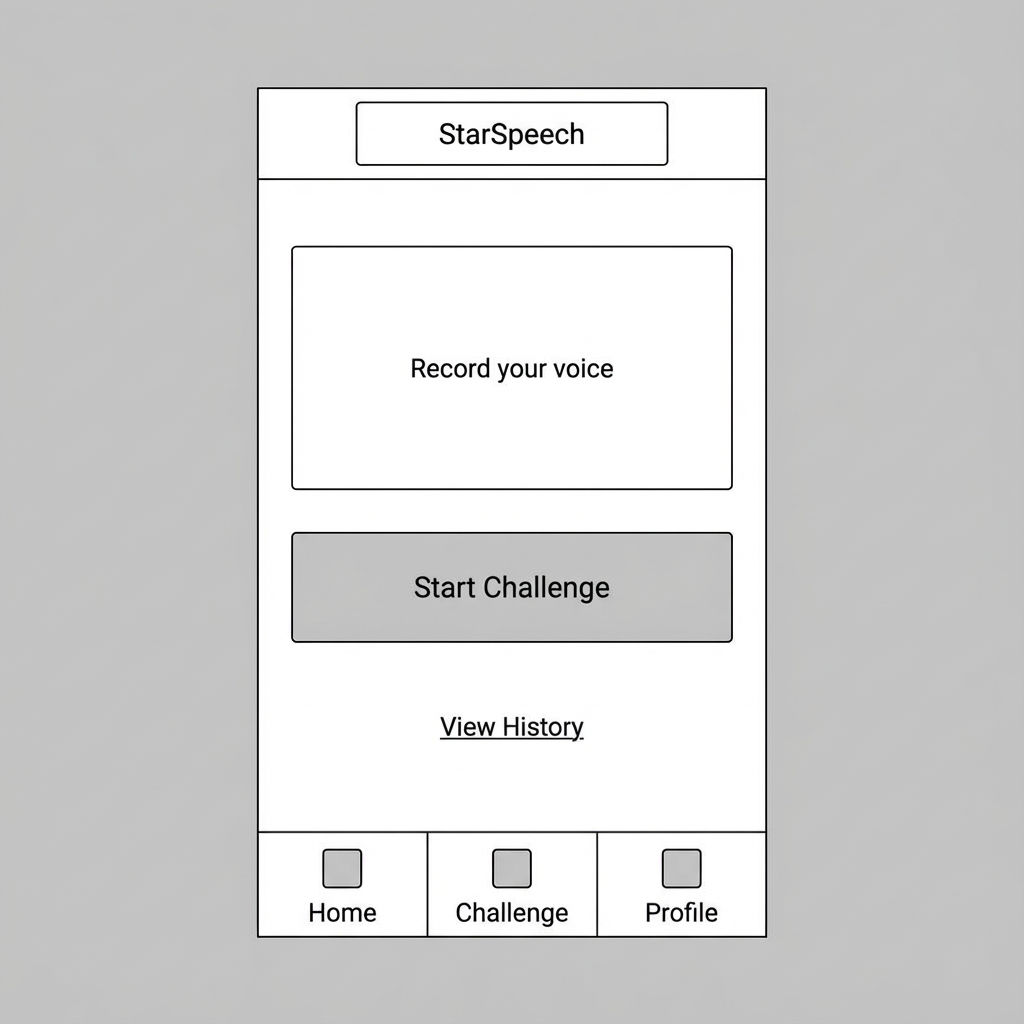
1) UI 와이어프레임 생성 프롬프트

첨부 이미지
Create a clean, low-fidelity UI wireframe for a mobile app. Focus on structure, spacing, and hierarchy without adding realistic textures. Include the following elements: - top navigation bar with title “StarSpeech” - single input field labeled “Record your voice” - primary button labeled “Start Challenge” - secondary link: “View History” - bottom tab bar with Home / Challenge / Profile icons Use simple grayscale boxes, center alignment, and clear section divisions. Aspect ratio: 9:16

🧩 2) 비즈니스 구조도(Organization / System Diagram)
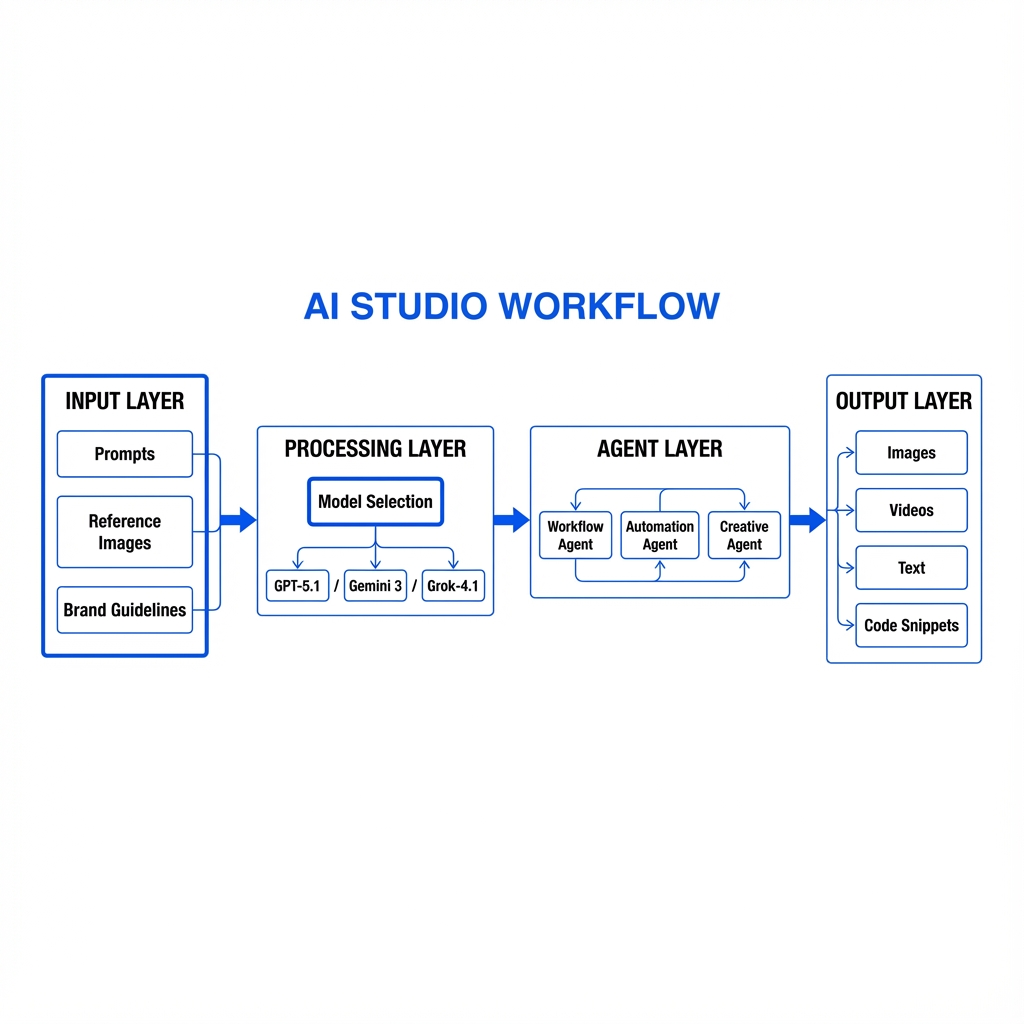
첨부 이미지
Create a clean, professionally structured business system diagram. Theme: “AI Studio Workflow” Include the following nodes: 1) Input Layer: Prompts, Reference Images, Brand Guidelines 2) Processing Layer: Model Selection (GPT-5.1 / Gemini 3 / Grok-4.1) 3) Agent Layer: Workflow Agent, Automation Agent, Creative Agent 4) Output Layer: Images, Videos, Text, Code Snippets Connect the nodes using directional arrows. Style: minimal, monochrome with one accent color (blue) Typography: bold titles, thin connector lines Ensure the diagram is logically aligned and easy to read. Aspect ratio: 16:9

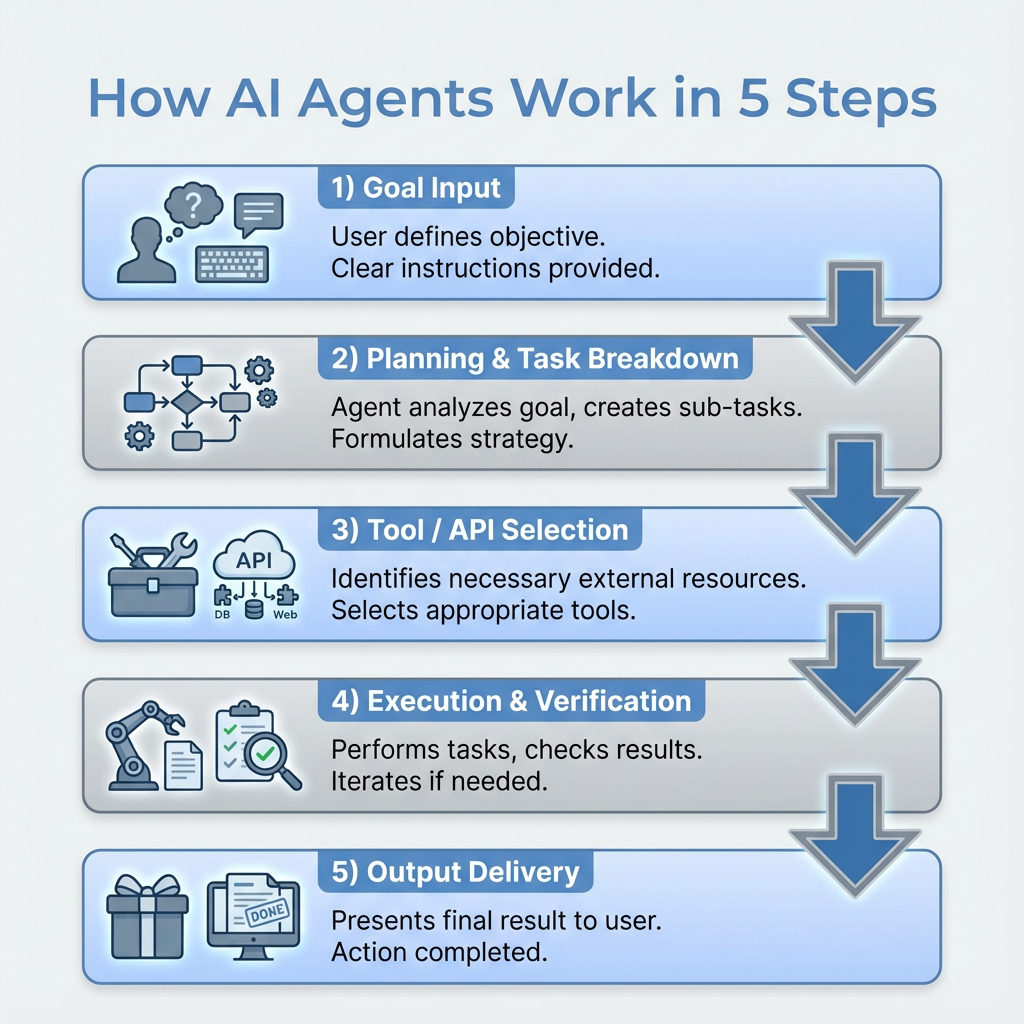
📊 3) 교육용 인포그래픽(Info Graphic)

첨부 이미지
Create an educational infographic titled: “How AI Agents Work in 5 Steps” Structure the infographic in vertical layout with five numbered blocks: 1) Goal Input 2) Planning & Task Breakdown 3) Tool / API Selection 4) Execution & Verification 5) Output Delivery Use simple icons, concise labels, and a soft blue-and-gray palette. Keep the text sharp and easy to read. Add arrow transitions between steps. Aspect ratio: 9:16 (poster style)

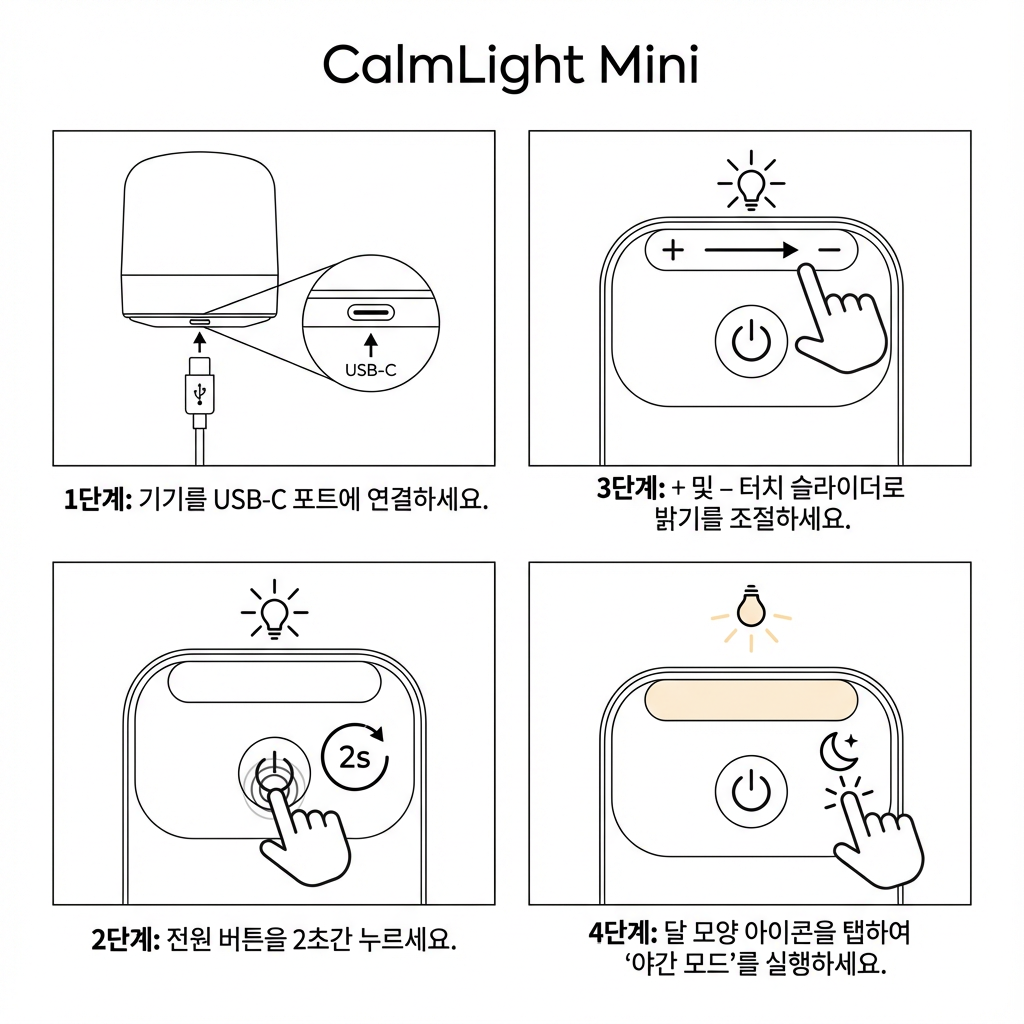
📦 4) 제품 사용 설명서(Instruction Diagram)

첨부 이미지
Create a clean instruction-style diagram for a small electronic device. Product name: “CalmLight Mini” Include: - Step 1: Plug device into USB-C port - Step 2: Press the round power button for 2 seconds - Step 3: Adjust brightness using the + and – touch sliders - Step 4: Activate “Night Mode” by tapping the moon icon Use thin outlines, simplified shapes, and consistent icon style. No shading or shadows (instruction manual style). Use clear Korean labels under each step. Aspect ratio: 4:5

🍵 5) 레시피 인포그래픽(Recipe Instruction Graphic)
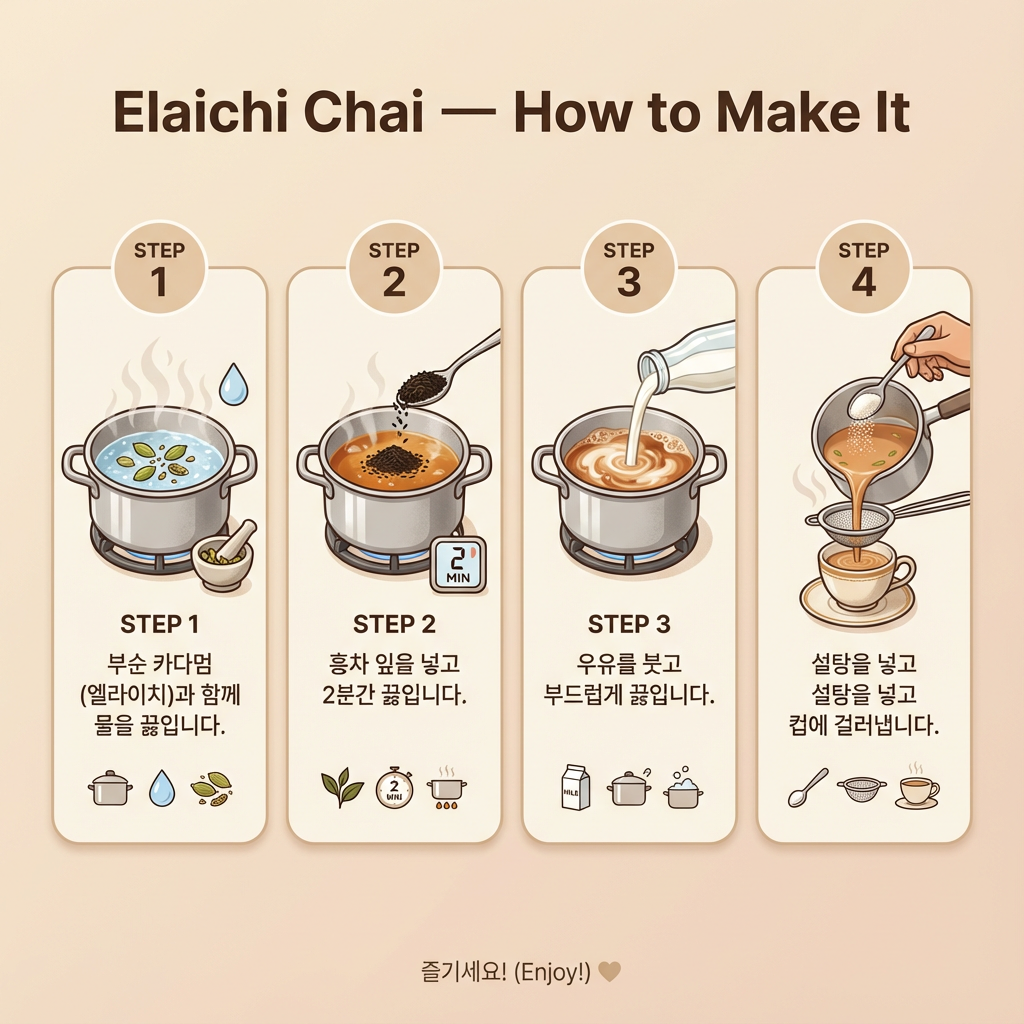
첨부 이미지


Create a clear and elegant recipe infographic titled: “Elaichi Chai — How to Make It” Include four steps with matching icons: 1) Boil water with crushed cardamom (elaichi) 2) Add black tea leaves and simmer for 2 minutes 3) Pour milk and bring to a gentle boil 4) Add sugar and strain into a cup Style: modern, clean, pastel beige background Text must be sharp and exactly readable in Korean: 각 단계에 짧은 문장으로 설명 표시 Add small icons (tea leaves, milk, pot, cup) Aspect ratio: 1:1

✨ Bonus

“로컬라이징 + 텍스트 치환 인포그래픽” 프롬프트

첨부 이미지

(해외 자료를 한국어 버전으로 바꿀 때 매우 유용)

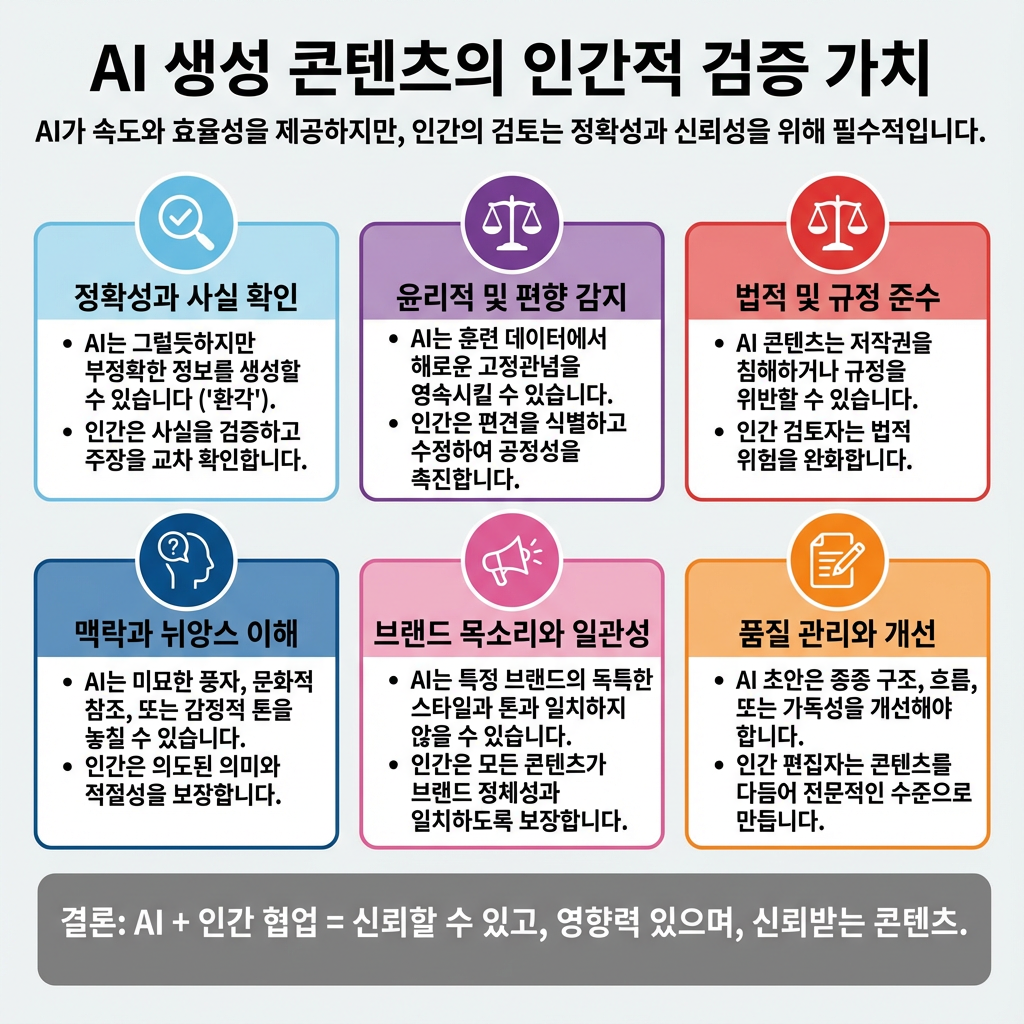
Take this image and recreate it as a Korean-localized infographic. Keep every visual element identical except: - Translate all English text to Korean - Maintain original font weight and layout - Ensure all Korean text fits properly without overlap - Keep icons, colors, structure, and background exactly the same

🟧 마치는 글 

이번 주 AI 소식은 모두 하나의 결론을 향합니다.

“팀과 비즈니스는 곧 AI를 기반으로 재조직될 것이다.”

모델의 우열은 하루 단위로 바뀌지만, 각 기업이 만드는 에이전트·자동화·이미지·코딩 생태계는 비즈니스의 기반을 흔드는 장기 전략입니다.

Nano Banana Pro처럼 고급 이미지·레퍼런스 매칭·브랜드 일관성 유지가 가능한 모델은 이제 개인도 스튜디오급 제작 시스템을 가질 수 있다는 의미이기도 합니다.

앞으로 중요한 건 ‘어떤 도구가 더 좋은가’가 아니라 그 도구로 어떤 구조를 설계하고, 어떤 시장을 열고, 어떤 속도로 실행하는가입니다.

기술은 경쟁이지만, 브랜딩과 실행은 결국 사람의 몫입니다. 우리가 더 빠르게 움직일 수 있는 시기가 온 만큼, 지금이 오히려 가장 자신만의 방식으로 움직여야 할 순간입니다.


이 뉴스레터가 도움이 되셨다면, 공유, 댓글, 스크랩도 큰 힘이 됩니다!

© 2025 All rights reserved.

All content in this newsletter — including text, images, design, and layout — is protected under applicable copyright laws. Images and visual materials were created using Midjourney (AI-generated art) under proper usage rights and creative direction by the publisher. Unauthorized reproduction, distribution, modification, retransmission, or commercial use without the publisher’s prior consent is strictly prohibited. For personal reference or non-commercial sharing, please ensure to clearly credit and attribute the original source.



몽환의 쉼표일기,
몽환의 쉼표일기,
컨텐츠 제작은 다양한 색깔이 넘치는 스튜디오 스무스
첨부 이미지
SNS로 교류해요!
SNS로 교류해요!
첨부 이미지


다가올 뉴스레터가 궁금하신가요?

지금 구독해서 새로운 레터를 받아보세요

이번 뉴스레터 어떠셨나요?

Weekly poetry 님에게 ☕️ 커피와 ✉️ 쪽지를 보내보세요!

댓글

의견을 남겨주세요

확인
의견이 있으신가요? 제일 먼저 댓글을 달아보세요 !

다른 뉴스레터

© 2025 Weekly poetry

문밖으로 한 발자국 내딛는 순간. 다양한 스팩트럼의 지식을 나눠요.

메일리 로고

도움말 자주 묻는 질문 오류 및 기능 관련 제보

서비스 이용 문의admin@team.maily.so

메일리 사업자 정보

메일리 (대표자: 이한결) | 사업자번호: 717-47-00705 | 서울특별시 성동구 왕십리로10길 6, 11층 1109호

이용약관 | 개인정보처리방침 | 정기결제 이용약관 | 라이선스