
In industrial and embedded systems, reliable communication between a human–machine interface (HMI) and the main controller is essential. While many modern devices use Ethernet or wireless networks, serial communication—such as UART, RS232, and RS485—remains a cornerstone. These interfaces are simple, cost-effective, and highly reliable, which makes them ideal for industrial and automation projects.
When combined with Android, these classic communication protocols create a powerful platform for visualization, control, and real-time monitoring. Instead of building a display system from scratch, engineers can integrate ready-made Android panels with serial ports, cutting both cost and development time.
What Is an Android Serial Control Screen?
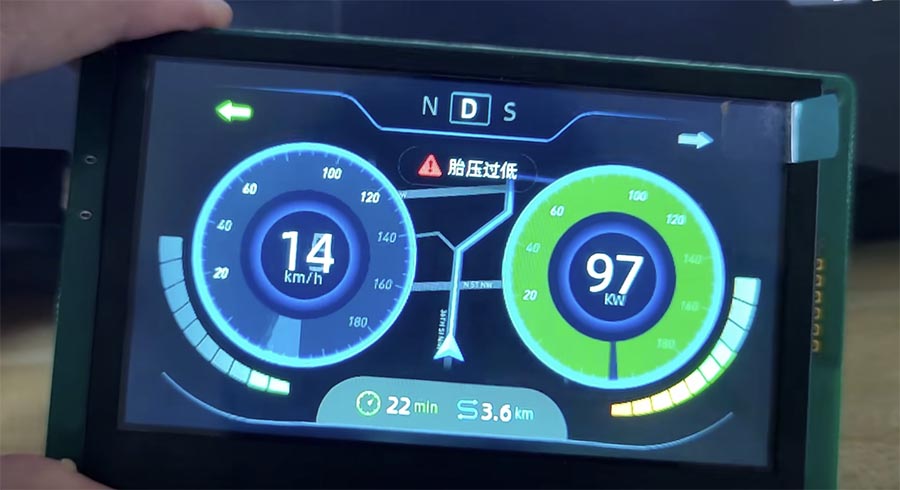
A serial Android control screen is a touchscreen display running the Android OS, capable of communicating with external devices via UART, RS232, or RS485. It typically serves as a smart front-end for industrial controllers, PLCs, or sensors.
It has three main functions:
• HMI interface – provides a graphical environment for data visualization and user control.
• Communication bridge – transfers serial data between Android apps and external devices.
• Embedded controller – performs local logic to reduce CPU load on the main system.
Why Serial Communication Still Matters
Even in 2025, serial protocols remain widely used because they’re simple, robust, and inexpensive. They don’t rely on network configuration, and they work reliably in noisy environments where Wi-Fi or Ethernet may fail. RS485 is especially valuable for its multi-device capability and long-distance communication, making it a backbone of industrial control networks.
How Android Connects Through UART, RS232, and RS485
Most Android-based boards—such as those using Rockchip or Allwinner SoCs—include one or more serial ports. Developers can access them through:
• The Android SDK’s serial APIs
• The NDK and device nodes like /dev/ttyS1
• Third-party libraries like UsbSerial
This setup allows Android to communicate with PLCs, Modbus sensors, or motor controllers directly through simple serial commands. The HMI can visualize real-time readings, modify settings, and log data locally or to the cloud.
Architecture of a Serial Android HMI
A typical structure includes:
- Hardware layer
- Communication layer
- Application layer
The Android panel often acts as the master device, polling data from the slaves and sending control commands through serial frames.
Benefits of Using Android for Serial HMIs
Rapid development – Android Studio, Jetpack Compose, and Flutter make HMI UI design fast and flexible.
Lower cost – Off-the-shelf Android panels eliminate the need for custom embedded hardware.
Cloud connectivity – With built-in Wi-Fi and Ethernet, Android bridges local serial systems to remote monitoring platforms.
Modern UI – Rich graphics, animations, and multi-language support.
Expandable design – Android supports USB, cameras, audio, and sensors, creating versatile control terminals.
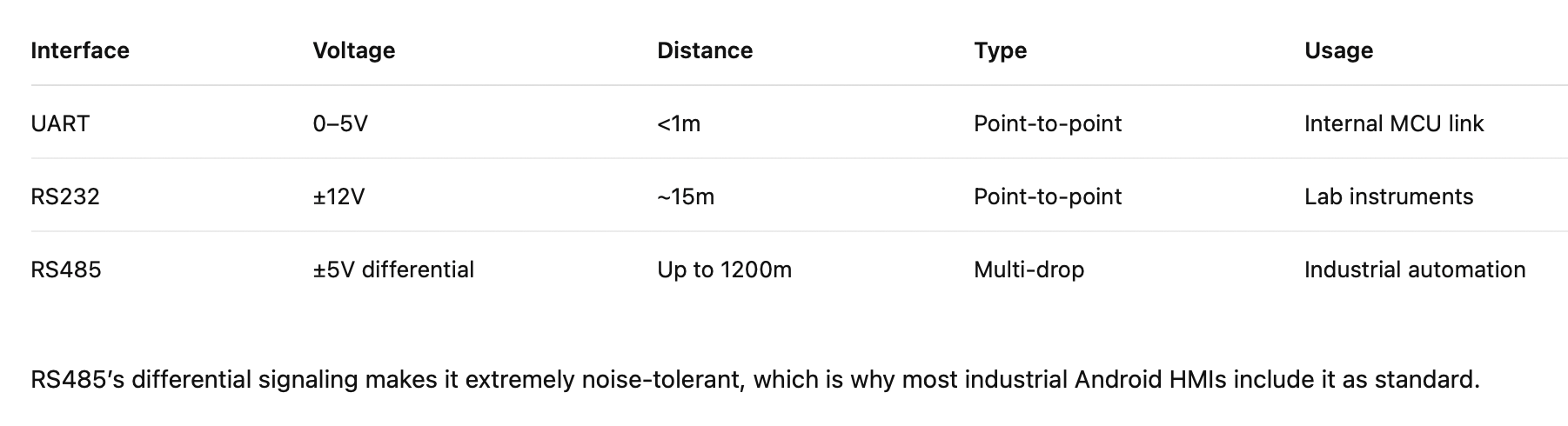
UART vs RS232 vs RS485
Typical Use Cases
Factory automation: Connect Android HMI to PLCs via RS485 for real-time control and monitoring.
Energy systems: Display and log inverter or meter data.
Medical devices: Provide intuitive touchscreen UI without rewriting firmware.
Public terminals: EV chargers, kiosks, and vending machines with serial interface control.
Software Design Notes
When developing a serial HMI app, keep in mind:
• Common baud rates: 9600 or 115200 bps.
• Framing: 8N1 (8 data bits, no parity, 1 stop bit).
• Use background threads to handle serial I/O smoothly.
• Implement CRC checks and retry logic for reliability.
These ensure stable communication and a smooth user interface.
Real-World Example
A manufacturer upgraded its temperature control unit with a 7-inch Android screen. Using RS485 Modbus communication, developers created an app in just two weeks that visualized temperature data, logged alarms, and adjusted settings.
The company achieved faster deployment and improved usability without redesigning the hardware.
Conclusion
An Android serial control screen is more than a display—it’s a complete intelligent HMI solution. By combining UART, RS232, and RS485 communication with Android’s flexibility, developers can modernize legacy systems with minimal effort.
Compared to traditional embedded HMIs, Android panels cut development time by up to 70% and dramatically reduce cost. They offer scalability, remote connectivity, and a polished user experience—making them the perfect foundation for next-generation industrial control systems.



의견을 남겨주세요