
By Meka Coven
A good answer from one AI does not tell you whether it is the right tool for your next task. ChatGPT may frame a problem one way, while Claude takes another route. If you change the prompt or context between tabs, you are comparing the setup as much as the models.
A quicker way to run the same test
SuperCompareAI is a Chrome extension that sends one question to the AI services you select and keeps the answers available for side-by-side comparison. Its official site currently lists 12 services, including ChatGPT, Claude, Gemini, Perplexity, Google AI Studio, Grok, GenSpark, Qwen, DeepSeek, Copilot, Z.ai, and Kimi.
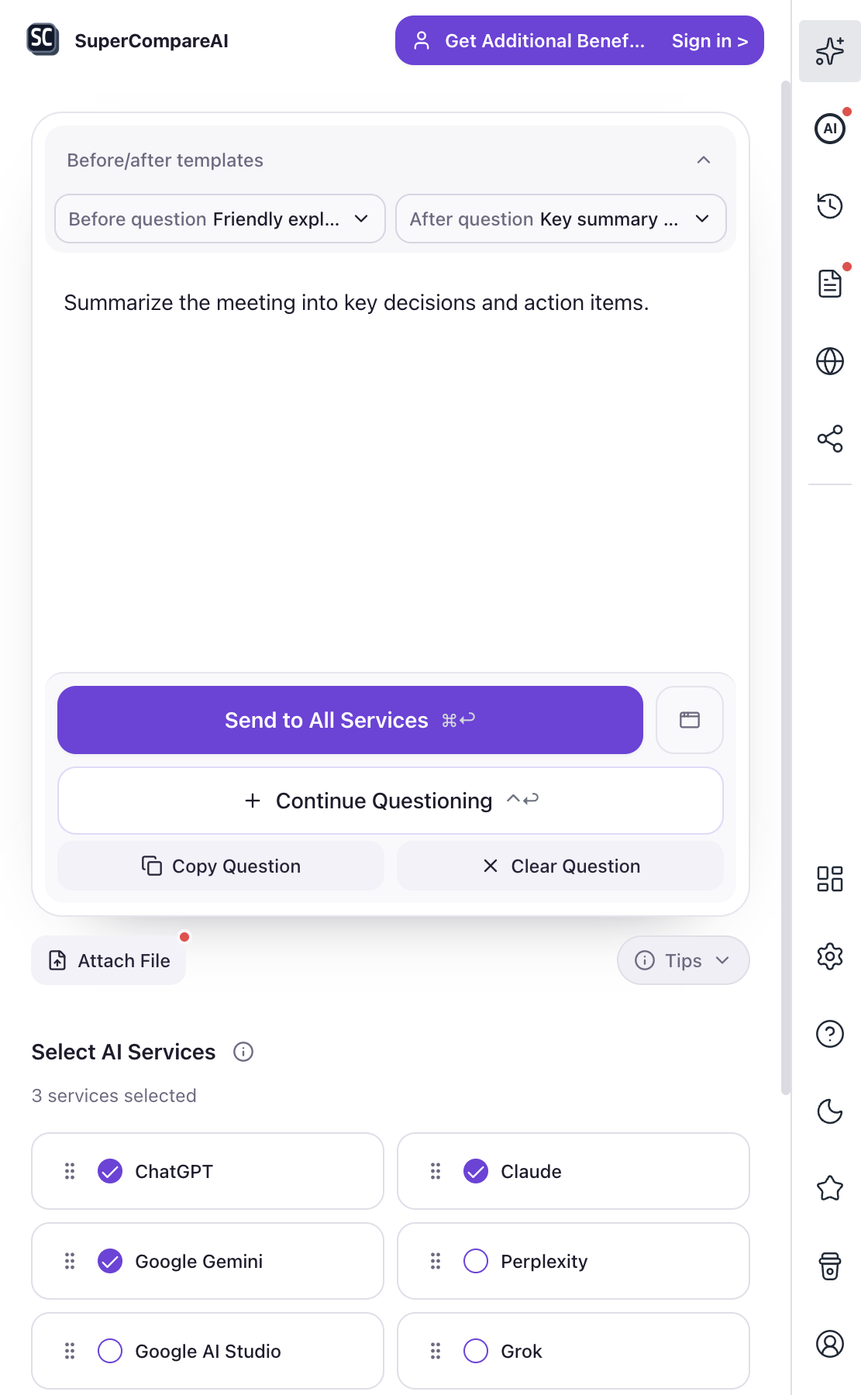
If you want to try the same workflow, visit SuperCompareAI or install the extension from the Chrome Web Store. The screenshot below is an official SuperCompareAI extension screen. It shows the question panel and the selected AI services, including ChatGPT, Claude, and Google Gemini.
Start with one of these links:
• Introduce: https://www.supercompareai.com/
• Chrome extension: https://chromewebstore.google.com/detail/supercompareai-compare-ch/fhbnhohjeakmodifnnmpmphacbnolfhf
Put ChatGPT and Claude on equal footing
For a useful ChatGPT vs Claude test, keep three things unchanged:
• Prompt: ask the same question in both services.
• Context: provide the same background, examples, files, and constraints.
• Follow-up: give both models the same chance to review or revise the answer.
Start with a task you actually repeat, such as drafting a product brief, reviewing a code change, outlining research, or planning a decision. A reusable prompt should tell the model what you know, what you want, what it must avoid, and how the answer should be structured.
Try a prompt like this:
Prompt example
I need help with [specific task]. Using only the context below, give me a recommendation, the assumptions behind it, two risks, and the next three actions. Mark anything that needs external verification.
Run that prompt in ChatGPT and Claude without changing the wording. A different prompt can make one model look better before the comparison even begins.
Compare the work, not the impression
Read both answers once without scoring them. Then use the same checklist:
• Did the answer follow every constraint?
• Did it use the context you supplied?
• Which claims or assumptions need checking?
• Can you act on the proposed next steps?
• Is the structure easy to scan later?
• What changed after the revision request?
A longer answer is not automatically a better answer. A shorter answer may be more useful when it is specific and makes fewer unsupported claims. Record what happened instead of deciding which model felt smarter.
Give both models the same second chance:
Prompt example
Review your previous answer. Identify the weakest assumption, one possible error, and one question you need answered before I act.
This tests whether each model can notice and correct a weakness, not just produce a confident first draft.
Compare several AIs without changing the setup
Copying one question into ChatGPT, Claude, Gemini, and other tabs works for a quick test. It becomes tiring when the prompt has a long context, a file, or several follow-up questions. It is also easy to change one detail by accident.
SuperCompareAI is useful at this point because it lets you choose the AI services and send the same question through one browser workflow. The product does not decide the winner for you. You still read the answers and decide which one fits the task.
The official product pages describe browser-based use with the AI accounts you already have. They also state that AI provider API keys are not required. Question history stays in the browser, according to the product site, so you can return to a previous comparison instead of rebuilding the prompt each time.
Use SuperCompareAI when the comparison grows
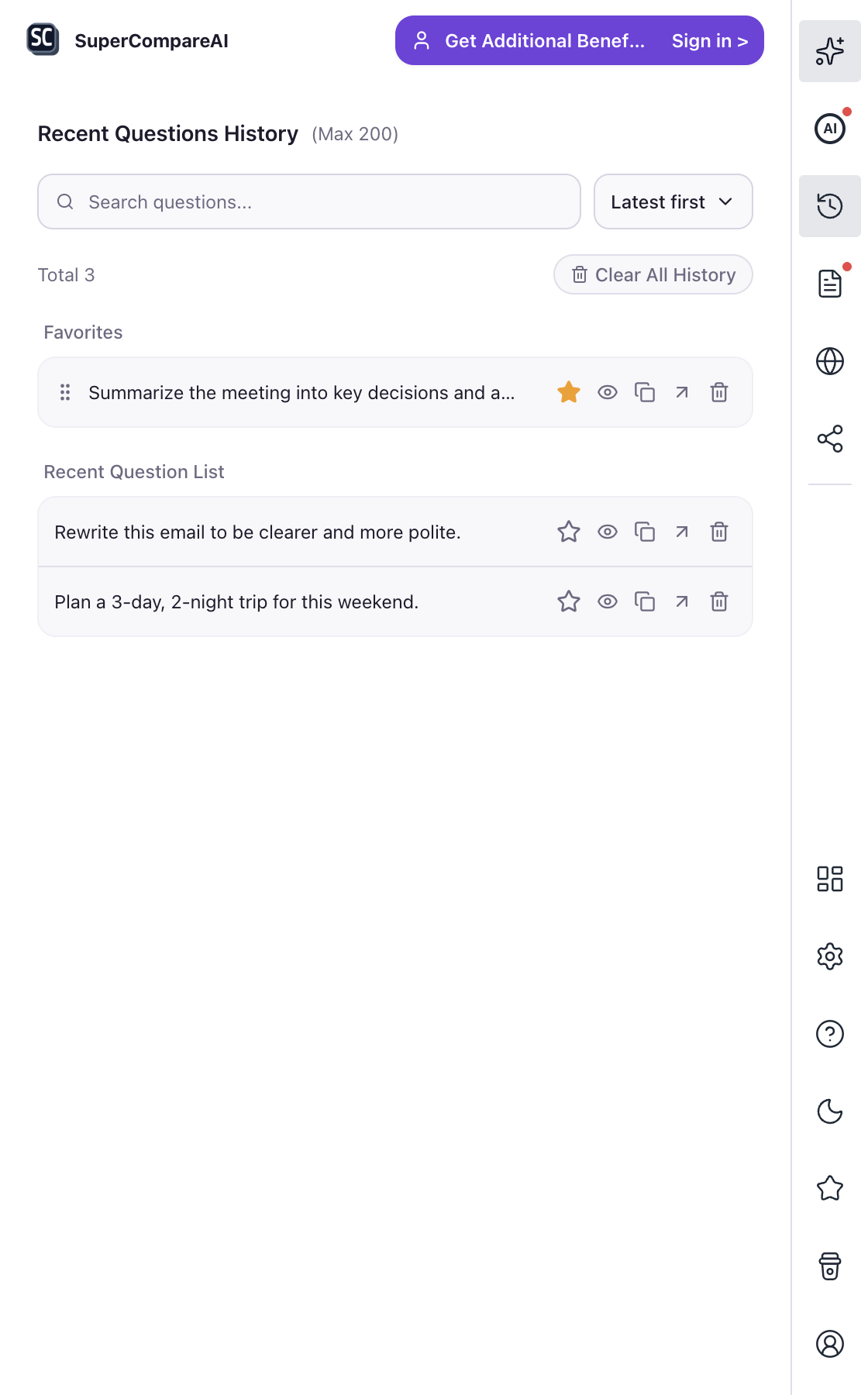
The official history screen shows recent questions that you can search, reuse, copy, or remove. That makes repeated ChatGPT vs Claude tests easier to organize. You can learn more at the SuperCompareAI website or get the Chrome extension. The next screenshot is an official SuperCompareAI screen showing question history and saved prompts.
Use the product here:
• Introduce: https://www.supercompareai.com/
• Chrome extension: https://chromewebstore.google.com/detail/supercompareai-compare-ch/fhbnhohjeakmodifnnmpmphacbnolfhf
Use a template when the task repeats
If you compare models for the same kind of work every week, save the instructions that should stay constant. For example, a code-review template might ask for:
• a short summary of the change
• the most serious possible bug
• missing tests
• one safer alternative
• questions that still need an answer
A research template might ask each model to separate known facts, assumptions, open questions, and sources to verify. The point is not to force identical writing. The point is to keep the evaluation criteria stable while the answers remain different.
After a few tests, keep a short record:
• Task and prompt used
• Context supplied to both models
• Claims that still need verification
• Useful next steps
• What changed after the follow-up
• Which model fit this task, and why
That record is more useful than a screenshot of one unusually good reply. It helps you choose a model for a specific job without turning one result into a universal ranking.
Choose by task, not by reputation
Writing, coding, research, planning, and file analysis can reward different kinds of answers. Run the same test on the work that matters to you. Keep the prompt, compare the outputs under the same conditions, and revise your checklist when you learn something new.
Start your next comparison
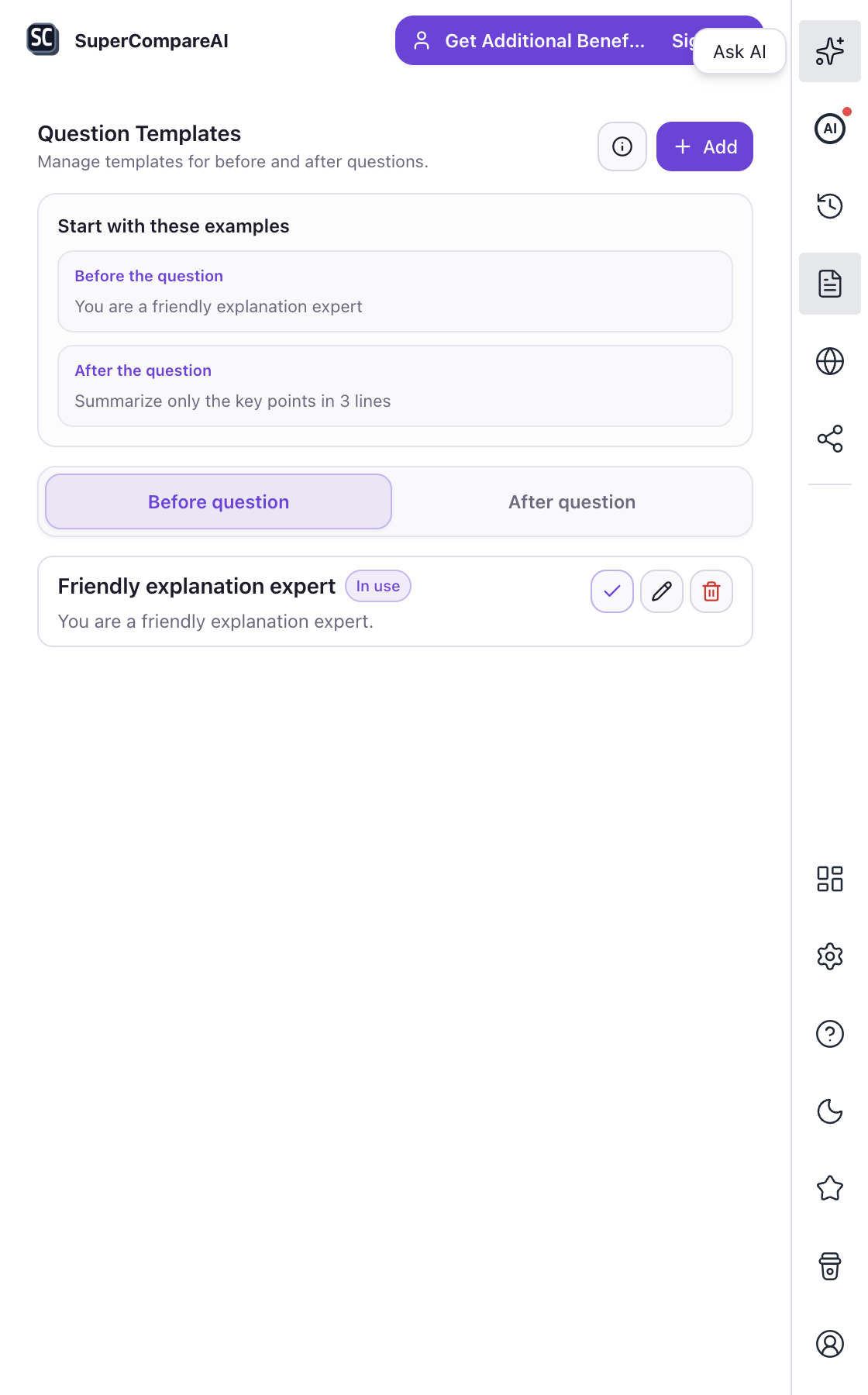
If you want to compare ChatGPT and Claude without repeating the same copy-and-paste routine, visit SuperCompareAI or install it from the Chrome Web Store. The final screenshot is an official SuperCompareAI templates screen. It shows how a repeated before-question and after-question instruction can stay ready for the next comparison.
Choose a starting point:
• Introduce: https://www.supercompareai.com/
• Chrome extension: https://chromewebstore.google.com/detail/supercompareai-compare-ch/fhbnhohjeakmodifnnmpmphacbnolfhf
Written by Meka Coven.